
The macOS App
MultiDocker ships with a native SwiftUI app for macOS 13+. It’s a graphical front-end
over the same engine the CLI uses — not a re-implementation. Every action in the app shells
out to the mdocker binary and decodes its --json output.
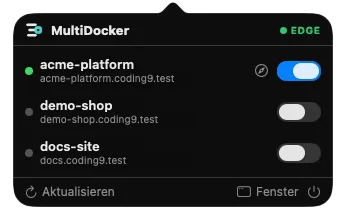
The app also lives in the menu bar. The popover gives you every project’s state and a toggle to start or stop it, without bringing the main window forward:
What it is
Section titled “What it is”The app wraps the CLI through Swift’s Process API. When you click “Start” on a project, it
runs mdocker up <name>; when it renders the project list, it parses mdocker ls --json.
This means:
- The app and CLI can never drift in behaviour — there’s one implementation of every verb.
- Anything the app does, you can reproduce (and script) on the command line.
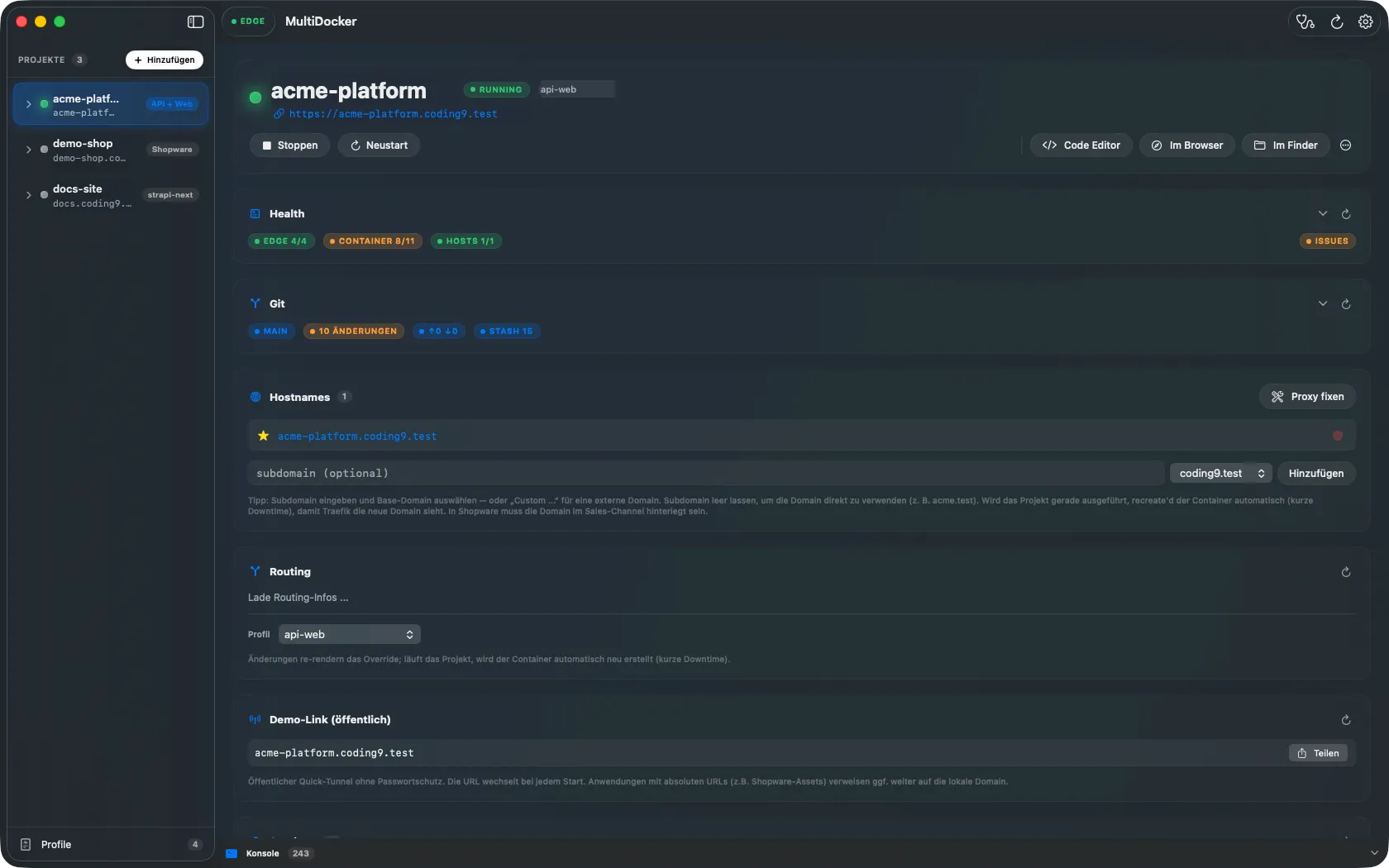
- The app adds presentation and orchestration on top: a sidebar, live health cards, embedded terminals, a profile editor, and a first-run wizard.
How it’s built
Section titled “How it’s built”The app follows an MVVM + dependency-injection structure:
View ──► ViewModel ──► Service ──► ProcessRunner ──► mdocker │ └──► Storage (preferences, logs, wizard state)- Views are dumb — they observe
@Publishedstate and send actions upward. - ViewModels own feature state and orchestrate service calls.
MdockerServiceis the umbrella service (~80 methods) that wraps every CLI verb, decodes models, and tracks in-flight actions for progress UI.ProcessRunneris the single place that createsProcessinstances, with PATH augmentation (so it findsbrew-installed tools) and a SIGTERM→SIGKILL timeout.
All services and view models are @MainActor, so UI updates are always thread-safe.
What you get in the window
Section titled “What you get in the window”| Area | What it shows |
|---|---|
| Sidebar | Registered projects, expandable to their AI/terminal sessions; a footer entry opens the global profile editor. |
| Detail pane | Per-project hero card plus health, Shopware, git, hosts, share, services, database and session cards. |
| Toolbar / menubar | A Doctor button, refresh, settings, and an EDGE badge that turns red when the edge stack is down. |
| Console | A collapsible bottom console showing every command the app ran, its output and exit code. |
Relationship to the CLI
Section titled “Relationship to the CLI”The app is optional. You can run everything from the terminal with mdocker. But the app
adds real value for day-to-day use: at-a-glance health, one-click start/stop, embedded
terminals that survive quitting the app, and a live profile editor with validation.
Read next
Section titled “Read next”- Installing & Runtime Model — how the bundled runtime works.
- Project List & Detail Cards — a tour of the main UI.
- Attached Terminals — embedded tmux sessions via SwiftTerm.
Cookie settings
We only use statistics tools if you allow it. Necessary storage keeps this site working; everything else is off until you decide.
Stores your choice from this dialog in your browser (localStorage). No cookie, no transfer to third parties.
Google Analytics 4 via Google Tag Manager, to measure how the site is used. Loaded only after you allow it.