
Built for OrbStack & Docker Desktop · macOS

Run every Docker project at once. No port wars.

MultiDocker gives each docker-compose project its own real HTTPS domain on your Mac — without ever touching your compose files. One central edge proxy, automatic TLS, zero conflicts.

MultiDocker — Run every docker-compose project at once, no port wars | Product Hunt (external link)

Works with OrbStack & Docker Desktop · macOS-native

zsh — mdocker

localhost:8081, :8082, :8083… sound familiar?

Juggling ports, editing compose files you don't own, address already in use, broken cookies on localhost. MultiDocker replaces all of it with project.coding9.test.

Without MultiDocker
$ docker compose up
Error: bind: address already in use
# edit someone else’s compose file…
ports: "8082:80"  # which one was this?
http://localhost:8083  # cookie broken
# oauth callback fails on localhost
With MultiDocker
$ mdocker up shopware-shop
✓ port pre-flight ok · attached to edge
# your compose file: untouched
→ https://shopware-shop.coding9.test
✓ real cert · cookies & redirects work
✓ oauth callbacks behave like production

Three commands. That's the whole workflow.

Register a project, start it, open it. Everything in between is automatic.

  1. 1
    mdocker init ./my-project

    Register

    Register a project. The profile is auto-detected.

  2. 2
    mdocker up my-project

    Start

    Start it. Ports are stripped, TLS labels injected, edge routing wired up.

  3. 3
    mdocker open my-project

    Open

    Opens https://my-project.coding9.test. Real cert, no warnings.

One edge. Every project attaches to it.

A single Traefik v3 on ports 80/443 routes hostnames to your containers over a shared Docker network. dnsmasq answers *.test, mkcert makes it trusted, Mailcatcher grabs all outbound mail.

MultiDocker edge architecture A browser on the macOS host asks the local dnsmasq resolver, configured through /etc/resolver/dev.test, for any *.dev.test hostname and gets 127.0.0.1 back. The browser then speaks HTTPS on port 443 to a single Traefik v3 edge router that terminates TLS with a mkcert wildcard certificate. Traefik and every project container share one Docker network called multi-docker-edge, so Traefik routes each hostname to the matching project container — acme-shop, aurora, orbit-api — and to Mailcatcher on mail.dev.test. A docker-socket-proxy gives Traefik read-only access to the Docker API. The original docker-compose.yml is never edited: MultiDocker renders a separate override file that removes host port mappings with Compose's !reset tag, joins the shared edge network and adds the Traefik labels. HOST · macOS Browser https://acme-shop.dev.test 1 · DNS dnsmasq /etc/resolver/dev.test *.dev.test → 127.0.0.1 2 · HTTPS :443 DOCKER NETWORK · multi-docker-edge Traefik v3 :80 / :443 from host wildcard cert · mkcert 3 · Host header → router docker-socket-proxy Docker API · read-only discovers labels acme-shop acme-shop.dev.test profile: shopware-dockware aurora aurora.dev.test profile: strapi-next orbit-api orbit-api.dev.test profile: generic Mailcatcher mail.dev.test !reset docker-compose.yml stays untouched MultiDocker never edits your compose file. It renders a separate override next to it: host ports out, edge network in, Traefik labels on. services: web: ports: !reset []

Architecture diagram. Architecture diagram: browser resolves *.test via dnsmasq, requests hit a single Traefik edge on 80/443, which routes over a shared Docker network to each project container; Mailcatcher and a docker-socket-proxy sit alongside the edge.

  • dnsmasq: Answers every *.test hostname locally — no /etc/hosts edits.
  • Traefik v3 edge: One proxy on 80/443 routes hostnames to the right container.
  • mkcert: Locally-trusted certificates, so HTTPS shows no warnings.
  • Mailcatcher: Captures all outbound SMTP in one shared inbox.

Your original compose is never touched — a separate override file uses Compose’s !reset to drop host ports.

  • dnsmasq Answers every *.test hostname locally — no /etc/hosts edits.
  • Traefik v3 edge One proxy on 80/443 routes hostnames to the right container.
  • mkcert Locally-trusted certificates, so HTTPS shows no warnings.
  • Mailcatcher Captures all outbound SMTP in one shared inbox.

Everything you need to run local like production.

A complete local edge stack, an editable profile engine, and a toolbox for the boring parts.

  • Real domains, real TLS

    Every project gets name.test over HTTPS via mkcert — trusted, no browser warnings.

  • Zero port conflicts

    A pre-flight check strips host ports and auto-remaps anything still clashing.

  • Never edits your compose

    An override engine generates a separate file with Compose's !reset — your originals stay pristine.

  • Auto profile detection

    Recognizes Shopware/Dockware, Strapi+Next, Laravel/Symfony and more; falls back to a generic profile for anything.

  • AI terminals per project

    Launch Claude Code, Copilot or a shell in a sandboxed, project-scoped tmux session.

  • Full database toolkit

    Dump, snapshot, restore, shell or open in TablePlus — dialect auto-detected.

  • Share a public demo link

    One command opens a Cloudflare tunnel — instant client demo, no account.

  • Central mail catching

    All outbound SMTP lands in one Mailcatcher inbox at mail.<domain>.

  • Git at a glance

    Branch, dirty counts, ahead/behind, stashes and worktrees per project — fully local.

  • Health & stats

    Aggregated edge/service/HTTP health plus live container resource stats.

  • Editable profiles

    Inspect, validate and override the YAML templates that drive routing.

  • Native Mac app

    A SwiftUI front-end over the same engine — or stay in the CLI. Your call.

The parts you’ll reach for every day.

Three of the features that make MultiDocker feel less like plumbing and more like a superpower.

AI terminals

Spin up Claude Code or Copilot, scoped to one project.

Per-project tmux sessions with a sandbox toggle. They survive app quit and re-attach in the native app.

Native app — terminal panel with per-project AI sessions.
mdocker terminal new shopware-shop --agent claude✓ tmux session created · sandbox: on✓ attached · scoped to shopware-shopmdocker terminal listshopware-shop claude ● livestrapi-site shell ● live
Native app — terminal panel with per-project AI sessions.

Database toolkit

Snapshot, restore, and open any database in one command.

Dialect auto-detection for MySQL, Postgres, Redis and Mongo. Copy a ready-made connection string, or launch straight into TablePlus.

Terminal — db snapshot then inspect with a ready-to-copy connection string.
mdocker db snapshot shopware-shop✓ mysql detected · snapshot savedmdocker inspect shopware-shopmysql://root:[email protected]:3306/shop↳ press o to open in TablePlus
Terminal — db snapshot then inspect with a ready-to-copy connection string.

Demo tunnel

Share a running project with a public link in seconds.

mdocker share opens a Cloudflare quick tunnel — no account, no config. Great for a fast client demo. Auto-cleans on down.

Terminal — share prints a public trycloudflare.com URL.
mdocker share strapi-site✓ cloudflare quick tunnel up→ https://brave-otter-42.trycloudflare.com↳ public link · auto-cleans on `mdocker down`
Terminal — share prints a public trycloudflare.com URL.

Less setup friction. More flow.

The everyday wins you feel from the first project you register.

  • Switch context without switching ports

    Open two client projects side by side and never think about which port is which again.

  • Onboard a project in seconds

    init + up and it just runs — no hand-editing compose files or hunting for free ports.

  • Local behaves like production

    Real HTTPS domains mean cookies, redirects, OAuth callbacks and absolute URLs work like they do live.

  • Your repos stay clean

    Because compose files are never touched, nothing MultiDocker does ends up in a commit or a diff.

  • Demo without deploying

    Show work-in-progress to a client over a public link without a staging server.

Native macOS app

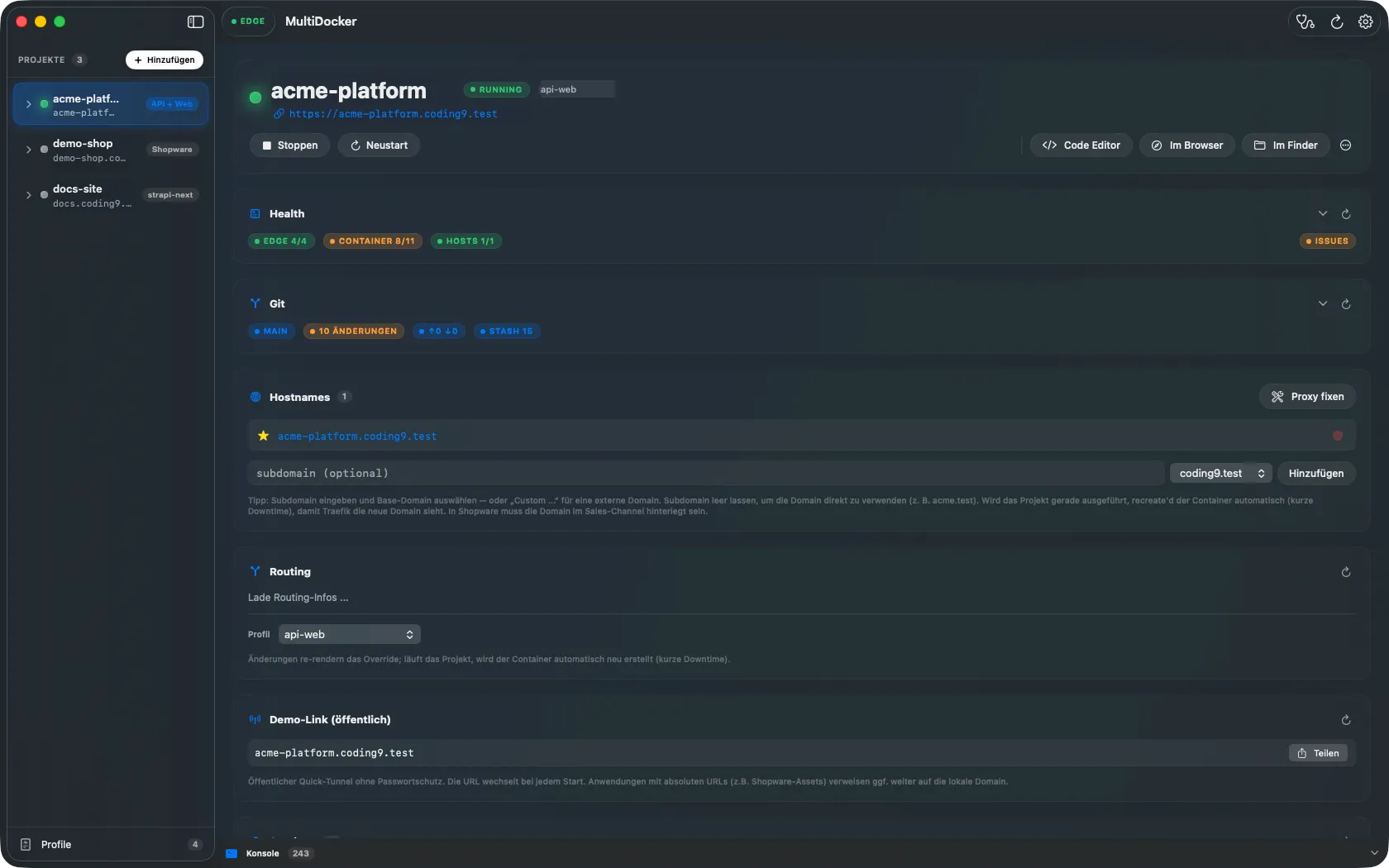
Prefer clicking? There's a native Mac app.

A SwiftUI front-end over the same engine — project list, health cards, git card, embedded terminals. Same power, no memorizing verbs.

MultiDocker native macOS app: the project list on the left, and on the right the selected project with its live URL, health and git cards, hostnames and routing.
MultiDocker.app — project list, health & git cards, hostnames and routing.
  • Project list

    Every registered project with live status and one-click open.

  • Health & git cards

    Service health, branch, dirty counts and ahead/behind at a glance.

  • Embedded terminals

    The same per-project AI sessions, docked right in the window.

On the roadmap

Where MultiDocker is heading. Rough order, not promises.

  1. Shipped

    Git info & demo tunnels

    Per-project git card and one-command public demo links — already in your hands.

  2. Next

    Branch environments

    A git worktree becomes its own instance: branch.project.test with a cloned database snapshot.

  3. Next

    Richer git tooling

    PR overview via gh, sidebar branch/dirty badges, remote visibility.

  4. Later

    Protected & stable tunnels

    Password-protected demo links and named tunnels with a stable URL.

  5. Later

    Integrations framework

    Hook up your issue tracker — click a ticket, get a branch, a subdomain and an AI terminal session.

Got an idea? Tell us on coding9.de

Download MultiDocker

Free while in beta. Grab the DMG, drag it to Applications, run the setup — done.

Download for macOS

macOS 14 or later · works with OrbStack and Docker Desktop

First launch: right-click the app and choose "Open" — the beta build is not yet notarized.

MultiDocker is provided free of charge and is used at your own risk. There is no claim to support, maintenance, updates, bug fixes or availability, and we may change or discontinue the offer at any time. By downloading you accept our terms of use.

Questions or feedback? Contact us at coding9.de